Home / Communication & Collaboration
What Is VoIP Calling? How Voice over IP Converts Voice into Data Packets

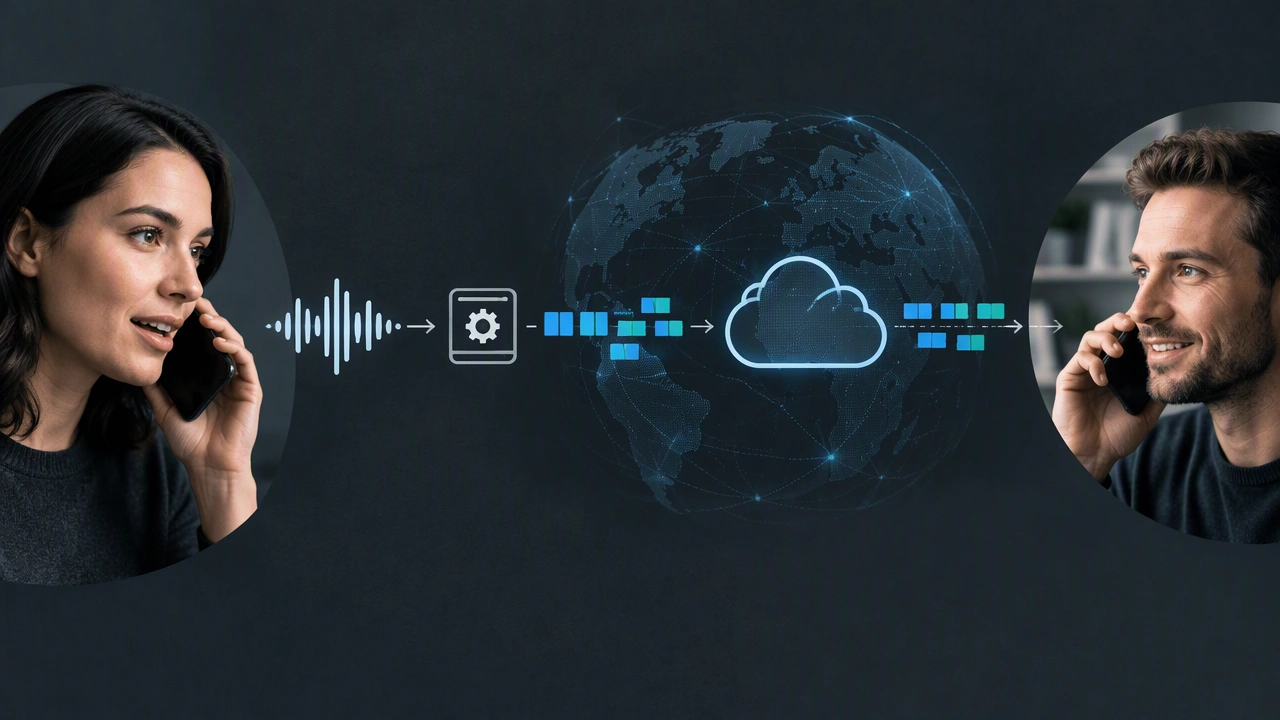
If you have ever wondered what is VoIP calling and how does it work, the answer starts with how your voice travels. Voice over Internet Protocol, commonly called VoIP, is a technology that lets you make telephone calls using an internet connection instead of a traditional phone line. Rather than sending your voice as a continuous electrical signal over dedicated copper circuits, VoIP converts the sound of your voice into digital data, breaks that data into small packets, routes those packets across IP networks, and reassembles them into audible speech at the other end. This packet-based method is what makes internet calling flexible, scalable, and often far less expensive than conventional telephony.
How Traditional Calling Differs from VoIP
In a traditional public switched telephone network, or PSTN, a call creates a dedicated circuit between you and the person you are calling. That circuit stays open for the entire conversation, even during silence, which uses network resources inefficiently. VoIP works differently. It uses packet switching, the same principle that powers the web, email, and streaming. There is no single dedicated path. Instead, your voice data shares the network with other data and takes the most efficient route available at that moment. Because the infrastructure is the internet itself, VoIP can integrate with computers, smartphones, and dedicated IP phones, and it can add features like video, messaging, and call forwarding without separate physical lines.
How VoIP Converts Voice into Data Packets Step by Step
The conversion from spoken sound to internet-transmitted data happens in four main stages. Each stage happens in milliseconds, so the conversation feels natural and immediate.
1. Capturing and Digitizing Your Voice
Everything starts with the microphone in your phone, headset, or computer. When you speak, your voice creates analog sound waves. The VoIP device or application samples these waves many thousands of times per second, a process called analog-to-digital conversion. Each sample measures the amplitude of the sound at that instant and assigns it a numerical value. The result is a stream of digital data that represents your voice. This raw digital stream is accurate but large, so it needs to be processed before it can be sent efficiently over the internet.
2. Compressing and Encoding with Codecs
Next, a codec, which stands for coder-decoder, compresses and encodes the digital voice data. Codecs reduce the size of the data by removing redundant information and by prioritizing the frequencies most important for speech intelligibility. Common codecs include G.711, which offers high quality with little compression, and G.729 and Opus, which compress more aggressively to save bandwidth while maintaining clarity. The choice of codec affects call quality, delay, and how much internet bandwidth the call requires. This step ensures that voice can travel smoothly even on connections with limited capacity.
3. Splitting Data into Packets and Sending Them
Once encoded, the voice data is divided into small packets, typically 20 to 30 milliseconds of audio per packet. Each packet is given headers that contain important information, such as the source and destination IP addresses, the correct order for reassembly, and a timestamp. These packets are then sent over the internet using transport protocols, most often UDP combined with RTP, the Real-time Transport Protocol, which is optimized for speed rather than perfect reliability. Unlike a file download, where every packet must arrive perfectly, VoIP prioritizes low delay, so a very small amount of packet loss is preferable to waiting for retransmission.
4. Reassembling and Converting Packets Back to Sound
At the receiving end, the process reverses. A jitter buffer temporarily holds incoming packets to smooth out variations in arrival time caused by network congestion. The packets are reordered if they arrived out of sequence, and any missing or severely delayed packets are concealed using error-concealment techniques to avoid audible gaps. The codec then decodes and decompresses the data, and a digital-to-analog converter turns it back into sound waves played through the listener’s speaker or headphones. All of this happens so quickly that the delay is usually imperceptible, often under 150 milliseconds one way.
The Invisible Layer: Signaling and Protocols That Set Up the Call
Beyond the voice packets themselves, VoIP needs signaling protocols to create, manage, and end calls. These protocols handle tasks like locating the other party, ringing their device, negotiating which codec both sides will use, and terminating the session when you hang up.
- SIP: Session Initiation Protocol is the most common signaling protocol. It registers your device with a VoIP server, initiates the call invitation, and handles features like call transfer and hold.
- RTP and RTCP: RTP carries the actual audio packets, while RTCP, the Real-time Transport Control Protocol, monitors transmission quality and provides feedback about packet loss and jitter.
- IP addressing and registration: Your VoIP provider maps your phone number or username to your current IP address, so incoming calls can find you even if your address changes.
What You Need for High-Quality VoIP Calling
VoIP can work on almost any broadband connection, but quality depends on network stability more than raw speed. A single voice call typically needs only 100 kilobits per second in each direction, but it needs that bandwidth consistently and with low latency.
- Stable internet connection: Wired Ethernet is generally more stable than Wi-Fi, and sufficient upload speed is as important as download speed.
- VoIP endpoint: This can be a hardware IP phone, a computer with a softphone application, or a smartphone with a VoIP app.
- Quality of Service configuration: Many routers can prioritize voice packets over other traffic to reduce jitter and delay when the network is busy.
- Power and backup: Unlike traditional lines that may work during a power outage, VoIP requires power for your modem, router, and device, so a backup power source is worth considering.
Where VoIP Is Used and Where It Has Limits
VoIP is now widely used for personal calls, business phone systems, and contact centers. It enables features that are difficult or expensive with traditional lines, such as video conferencing, voicemail to email, automatic call routing, and the ability to keep the same number on multiple devices. Because calls are routed over the internet, long-distance and international calls are often much cheaper.
- Advantages: Lower costs, portability across devices and locations, easy scalability, and integration with collaboration tools.
- Limitations: Sensitivity to network congestion, dependence on power and internet availability, and the need for proper configuration to ensure emergency calling reaches the correct location.
- Security considerations: Like any internet service, VoIP should be protected with encryption, strong passwords, and updated software to prevent eavesdropping or call fraud.
Understanding VoIP as a Modern Internet Service
VoIP illustrates a broader shift in how internet services work: converting real-world information, in this case your voice, into data packets that can be routed efficiently across a shared global network. By digitizing, compressing, packetizing, and reassembling audio in real time, VoIP delivers a calling experience that is both familiar and fundamentally different from the analog systems that preceded it. When the network is well-configured and stable, the result is clear, reliable communication that blends seamlessly with other digital tools for work and everyday life.