Home / Streaming & Entertainment
How Video Streaming Adapts Quality: Adaptive Bitrate Streaming Explained
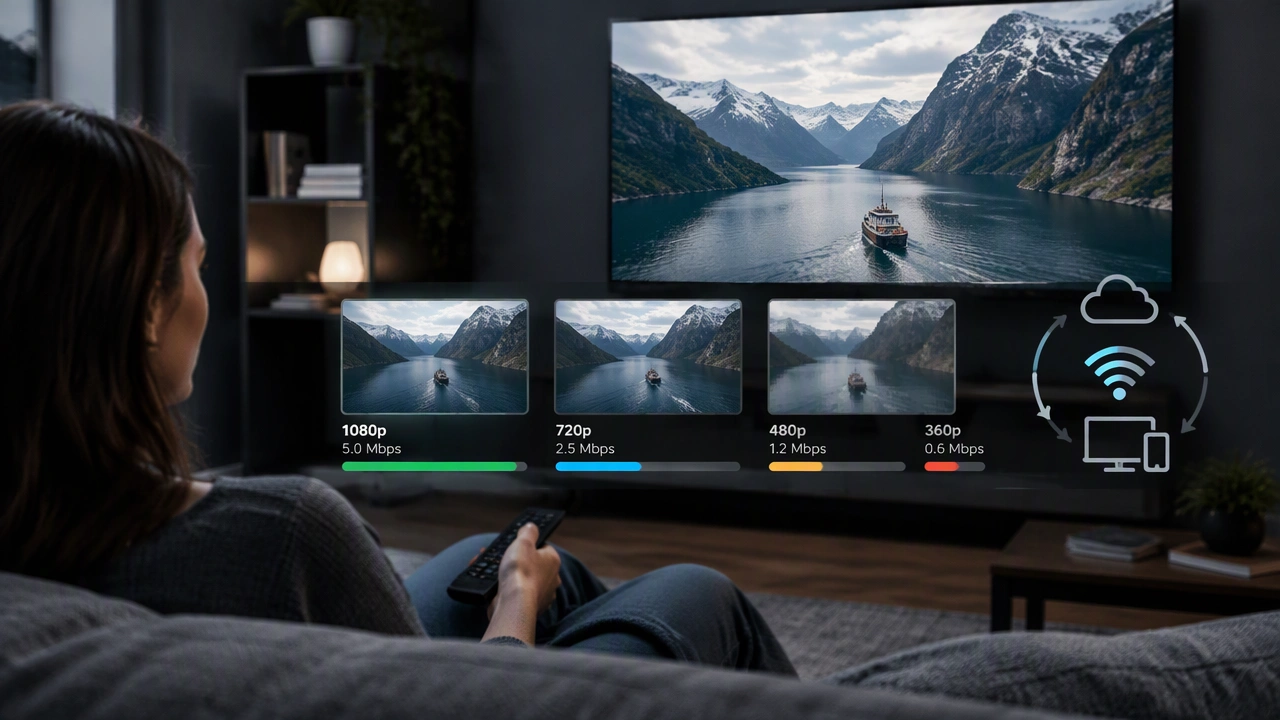
When you press play on a show, the picture may start modest, then sharpen after a few seconds. That shift is not an accident. Modern web services use a technique called adaptive bitrate streaming, or ABR, to tune video quality to your connection in real time. This article explains what ABR is, how it decides what to send, and why your screen sometimes looks crisp and other times soft.
What adaptive bitrate streaming is
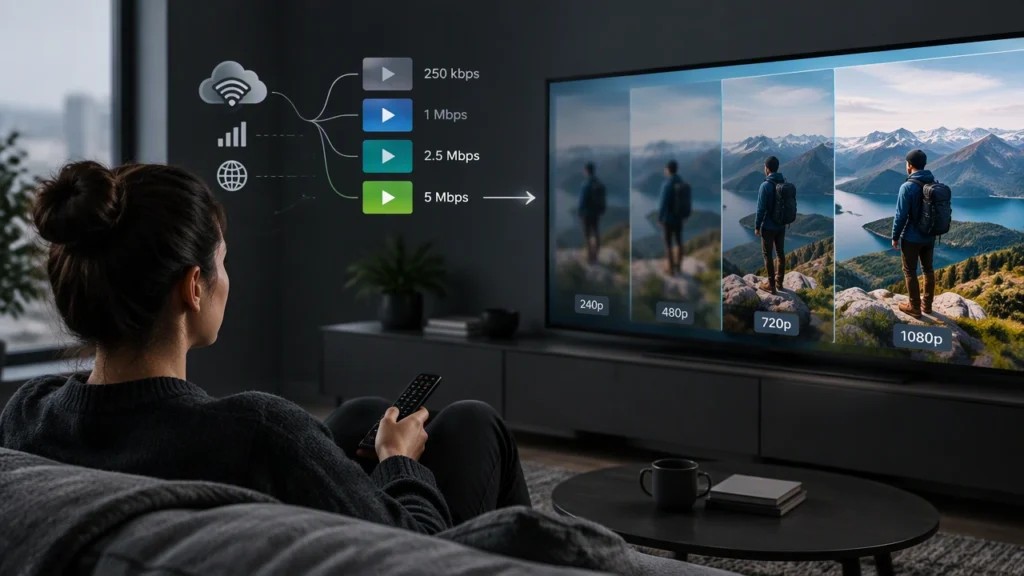
Adaptive bitrate streaming is a method for delivering video in small chunks while offering several quality levels for each chunk. Instead of sending one giant file that assumes a fixed speed, the player chooses from a ladder of options that range from low resolution at a low data rate to high resolution at a high data rate. The player tests what your network can carry right now and picks a level that should play without interruption.
Each option is called a rendition. A typical ladder might include 360p at about 600 kilobits per second, 720p at 2 to 3 megabits per second, and 1080p at 5 to 8 megabits per second. On fast networks, some services also offer 4K at 15 to 25 megabits per second. The exact numbers vary by provider and title.
Why video is broken into chunks
ABR works because video is not streamed as a continuous stream in the old sense. It is split into segments that are usually 2 to 10 seconds long. The player downloads one segment, then requests the next. Between segments it can change its mind. If the network slows, it can drop to a lower rendition for the next segment. If the network speeds up, it can climb back to a sharper rendition.
This chunked design also helps with caching. A content delivery network, or CDN, can store popular segments near you so they arrive faster. It also lets services use standard web infrastructure, since each segment is a small file fetched over HTTPS.
How the player chooses the next quality
The core question is simple: which rendition can the player download fast enough to keep the buffer full? The buffer is the reserve of upcoming video stored on your device. A healthy buffer prevents stalls. The player monitors three things to make its choice.
- Download throughput: The player measures how many bytes per second it actually received for recent segments. This is the main signal.
- Buffer level: If the buffer is low, the player becomes conservative and prefers a safer, lower bitrate to avoid a stall.
- Segment complexity: Some players estimate whether the next scene is easy or hard to encode and adjust their choice slightly.
If your measured speed is 6 megabits per second and the buffer is healthy, the player might select a 5 megabits per second rendition. If your speed drops to 2 megabits per second, it may step down to 2.5 megabits per second. If the buffer is nearly empty, it may drop even further to keep playback going.
What makes your connection change
Your network speed is not a fixed pipe. It fluctuates because of Wi‑Fi interference, distance from the router, congestion in your home, traffic on your ISP, and conditions inside the CDN. On mobile, moving between cells or entering a building can cause quick dips. Even wired connections can vary during peak hours. ABR exists precisely because these changes are normal.
How does video streaming adjust quality automatically
The player uses an algorithm that runs on your device, not on the server. It runs continuously, often every time a segment finishes downloading. A simple version compares recent throughput to the bitrates in the ladder and picks the highest rendition whose bitrate is below the measured speed, with a safety margin. More advanced versions combine throughput with buffer occupancy and add smoothing so the player does not jump between levels too often.
Most services also add rules to reduce thrashing. They may require several segments of evidence before stepping up, or require a larger drop in speed before stepping down. Some players also pause short bitrate increases near the start so the first few segments arrive quickly and playback begins fast.
The encoding side of the ladder
ABR depends on a well-built encoding ladder. Engineers choose resolutions, frame rates, and bitrates that balance clarity and cost. They use modern codecs like H.264, H.265/HEVC, or AV1 to compress video efficiently. They also use per-title or per-scene encoding, which means the service analyzes each movie or episode and assigns bitrates based on its complexity. Fast motion or grainy night scenes may get higher bitrates at the same resolution than static interviews.
Some services also use content-aware encoding, which optimizes every scene to hit a quality target with the fewest bits. This can reduce bandwidth without making the picture look worse. It also helps ABR because the ladder is tuned to the actual content.
Latency, startup, and the first seconds
ABR affects how quickly a video starts. If the player requests very high quality at the beginning, it may need to wait longer to fill the buffer. Many services therefore start with a mid or low rendition and climb once the buffer is healthy. This keeps startup fast. For live events, services use shorter segments and sometimes chunk durations closer to 1 to 2 seconds to reduce delay, though this can make ABR decisions a bit noisier.
What you see on screen
When your connection is strong and stable, the player stays near the top of the ladder and the image looks sharp. When your connection weakens, the player steps down to a lower bitrate, which often means a lower resolution and softer detail. You may also notice brief dips in color detail or slight blockiness during fast motion. The tradeoff is intentional. A slightly softer image that keeps playing is usually better than a crisp image that stalls.
How services keep it smooth
Large streaming platforms run thousands of A/B tests on their players. They tune buffer targets, step-up and step-down rules, and startup behavior. They also monitor real-world performance by region and device. On the network side, they place CDN nodes close to viewers and replicate popular content. All of this supports the player as it makes its per-segment choices.
What you can do as a viewer
- Reduce competition for bandwidth: Pause large downloads or cloud backups while you stream.
- Improve Wi‑Fi: Move closer to the router, use 5 GHz where possible, or consider a wired connection.
- Use quality controls: Many apps let you cap the maximum quality if you prefer fewer shifts over the highest detail.
- Keep apps updated: Player updates often improve ABR logic and codec support.
Why this matters
Adaptive bitrate streaming is the quiet engine behind smooth online video. It turns unpredictable networks into reliable playback by matching quality to real conditions, segment by segment. Understanding how does video streaming adjust quality automatically helps you set expectations, troubleshoot issues, and make small changes that improve your experience. Next time the picture softens for a moment, you will know the player is doing exactly what it should: keeping the show playing.